
How to pay for your order
Choose the payment method that suits you: MTN Mobile Money, Airtel Money, Visa or Mastercard, cash, or Wallet.
Checkout shows the methods available for your order. Cash options depend on your delivery or pickup choice; Wallet depends on your available balance.
At checkout, these payments go through PesaPal. It’s the payment service that connects your order to MTN, Airtel and the card options shown on the payment screen.
Screenshots show an example order. Use your own phone number and check your order’s amount. Tap an image to enlarge it.
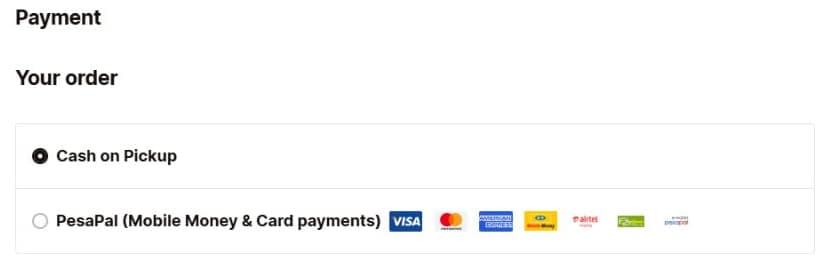
1Choose your payment method
On the Payment step, choose a method offered for your order. For MTN Mobile Money, Airtel Money or a card, select PesaPal (Mobile Money & Card payments). For cash or Wallet, choose the corresponding option if shown.
Review your order total, read the terms and agree if you’re happy to continue. Select the final Pay button to continue. With PesaPal, this opens the carrier and card options; with cash, you place the order and pay at pickup or delivery.
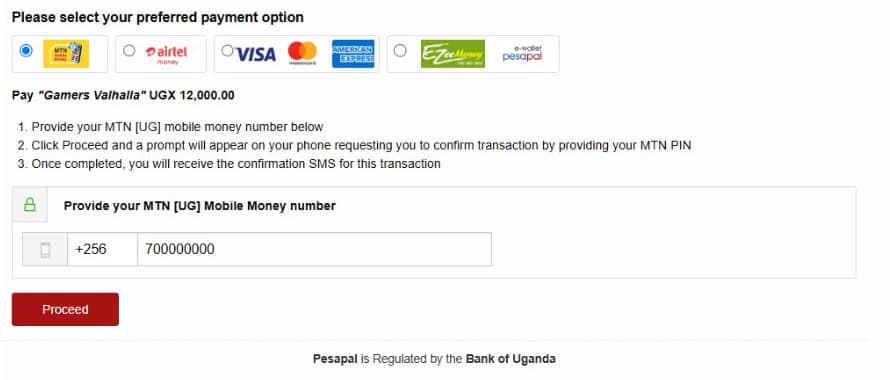
2Pay with MTN Mobile Money
- Select the MTN logo on the payment screen.
- Check that you’re paying Gamers Valhalla and that the amount matches your order.
- Enter your MTN Mobile Money number in the format requested by the form.
- Select Proceed, then follow the MTN payment prompt on your phone.
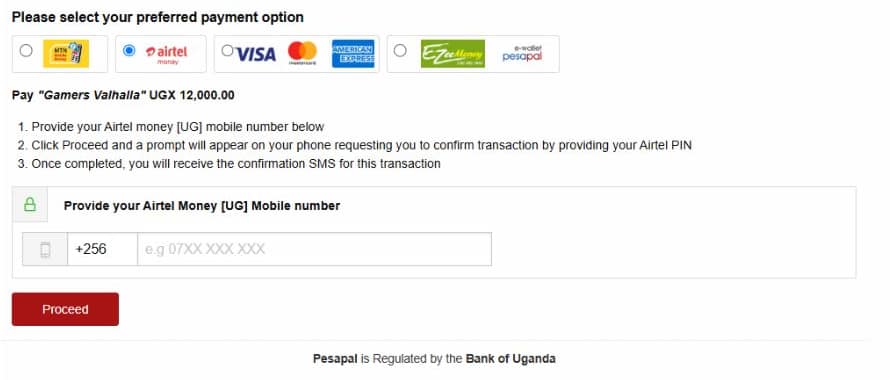
2Pay with Airtel Money
- Select the Airtel Money logo on the payment screen.
- Check that you’re paying Gamers Valhalla and that the amount matches your order.
- Enter your Airtel Money number in the format requested by the form.
- Select Proceed, then follow the Airtel Money payment prompt on your phone.
3Approve the payment on your phone
Follow the MTN or Airtel instructions shown on your phone. Check the amount before approving with your PIN. Keep the confirmation SMS as your payment reference.
Enter your PIN only in the MTN or Airtel prompt on your phone. Our team will never need your PIN.
4Check your order’s payment status
After paying, return to the website and check the payment result and your order number. You can also open the order through My Account.
Money deducted, but the order still shows pending? Don’t pay again. Contact us with your order number and the MTN or Airtel transaction reference so we can check it.
Pay with cash, a card or Wallet
Cash on Pickup or Cash on Delivery
If a cash option is available for your order, choose it instead of PesaPal. With Cash on Pickup, pay when collecting your order. With Cash on Delivery, pay when your order arrives. Check the final total and any charges at checkout.
Visa or Mastercard
Choose PesaPal at checkout, then select the card option on its payment screen. Follow the card form and any approval requested by your bank.
Wallet
If Wallet is offered for your order, follow the checkout instructions and check the amount covered by your available balance.
Need help with a payment?
Visit Contact Us. Include your order number and, if money was deducted, your transaction reference. Keep your PIN private.