

PUBG Mobile UC (Global)
PUBG Mobile Global UC or WOW Coins delivered directly to the Player ID you provide. Select the correct currency and package.
Not supported: Japanese, Korean, Taiwan or Vietnam servers.
After payment confirmation, we process your top-up and email you once it has been credited.
PUBG Mobile UC & WOW Coins (Global) Top-Up
UC (Unknown Cash) is the in-game currency used in PUBG Mobile. Choose a UC package to buy eligible outfits, weapon skins, crates, Royale Pass upgrades and other available in-game content.
This is a direct account top-up. The selected UC or WOW Coins package is credited to the PUBG Mobile account linked to the Player ID you provide; there is no redeemable code to enter.
Choose the Correct Currency
Choose from 10 UC packages or 6 WOW Coins packages. UC and WOW Coins are different package types: selecting WOW Coins does not purchase UC. Check the currency name and amount carefully before paying.
What Can You Use UC For?
- Purchase available outfits, weapon skins and cosmetics.
- Access eligible Lucky Spin and other in-game events.
- Buy Royale Pass upgrades and other content offered in the game.
Supported Accounts
This product is for supported PUBG Mobile Global accounts. Japanese, Korean, Taiwan and Vietnam servers are not supported. Check your game version and server before purchasing.
How to Order
- Select the UC or WOW Coins package you want.
- Enter and confirm your PUBG Mobile Player ID.
- Check the package and Player ID, then complete your order and payment.
- Our team will confirm payment and process the top-up.
- Once you receive our delivery confirmation email, check the balance on the account you supplied.
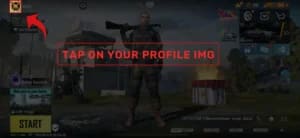
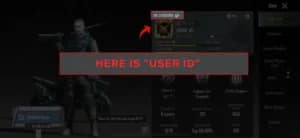
How to Find Your PUBG Mobile Player ID
- Log in to PUBG Mobile.
- Open your player profile.
- Find your numeric Player ID and enter it exactly as shown. Use the Player ID, not your display name.
Delivery and Order Updates
After confirming your payment, our team will process your top-up using the Player ID you provide. We will email you once the top-up has been successfully delivered.
If you need help with your order, contact Gamers Valhalla with your order number.
Why Buy from Gamers Valhalla?
- Prices and checkout in Ugandan shillings.
- Direct top-up using your Player ID.
- Email confirmation when your top-up is delivered.
Read Before You Buy
- Only your Player ID is needed for this top-up. Do not share your game password.
- Double-check your Player ID, supported server and selected package before paying.
- The top-up goes to the account linked to the Player ID you submit. An incorrect ID can cause a failed order or delivery to another account; recovery may not be possible.
- You may remain logged in during processing. If the balance has not refreshed after delivery confirmation, restart the game and check again.
- If you notice an incorrect Player ID after ordering, contact us promptly with your order number. Corrections depend on whether the top-up has already been processed.
Based on 0 reviews
Only logged in customers who have purchased this product may leave a review.
Related products
-
Consoles, Our Shop, PlayStation, PlayStation 4, PlayStation Accessories in Uganda, PS4 Accessories in Uganda, Racing Wheels
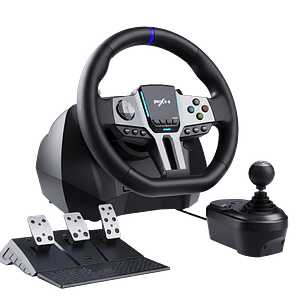
PXN V9 Gen2 Racing Wheel with Shifter and Pedals
 Consoles, Our Shop, PlayStation, PlayStation 4, PlayStation Accessories in Uganda, PS4 Accessories in Uganda, Racing Wheels
PXN V9 Gen2 Racing Wheel with Shifter and Pedals
-
✅ Wide Compatibility – Works with PC, PS3, PS4, Xbox One, and Xbox Series X|S
-
🎮 Dual Steering Modes – Switch between 270° (arcade) and 900° (simulation) driving angles
-
⚡ Realistic Vibration Feedback – Dual motors for immersive racing feel
-
🚗 Includes Pedals & Shifter – 3-pedal set (clutch, brake, throttle) and 6+1 H-pattern gear shifter
-
📱 App Customization – Adjust wheel settings, vibration, and button mapping via PXN Wheel app
-
🌈 RGB Light Bar – Visual feedback for throttle and braking intensity
-
🔄 Hall Sensor Pedals – Accurate, long-lasting pedal response
-
🧩 Programmable Buttons – Customize controls for your favorite racing games
SKU: CVN-SDF-364 -
-
-
-
Controllers, Our Shop, PlayStation, PlayStation 4, PS Controllers, PS4 Controllers in Uganda
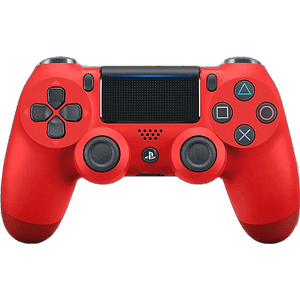
Sony DualShock 4 Wireless Controller for PlayStation 4 – Red
-24%Controllers, Our Shop, PlayStation, PlayStation 4, PS Controllers, PS4 Controllers in UgandaSony DualShock 4 Wireless Controller for PlayStation 4 – Red
DualShock 4 Wireless Controller (Red) for PS4 with touch pad, light bar, built-in speaker, 3.5mm headset jack, motion sensors, and micro-USB charging.
SKU: APP-CLS-545 -
Controllers, Our Shop, PlayStation, PlayStation 4, PS Controllers, PS4 Controllers in Uganda
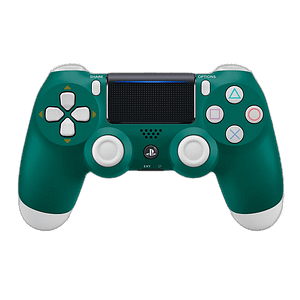
PS4 DualShock 4 Controller Alpine Green
-49%Controllers, Our Shop, PlayStation, PlayStation 4, PS Controllers, PS4 Controllers in UgandaPS4 DualShock 4 Controller Alpine Green
DualShock 4 Wireless Controller (Alpine-green) for PS4 with touch pad, light bar, built-in speaker, 3.5mm headset jack, motion sensors, and micro-USB charging.
SKU: SON-PS4-CTL-SONY-PLA6D43



There are no reviews yet.