

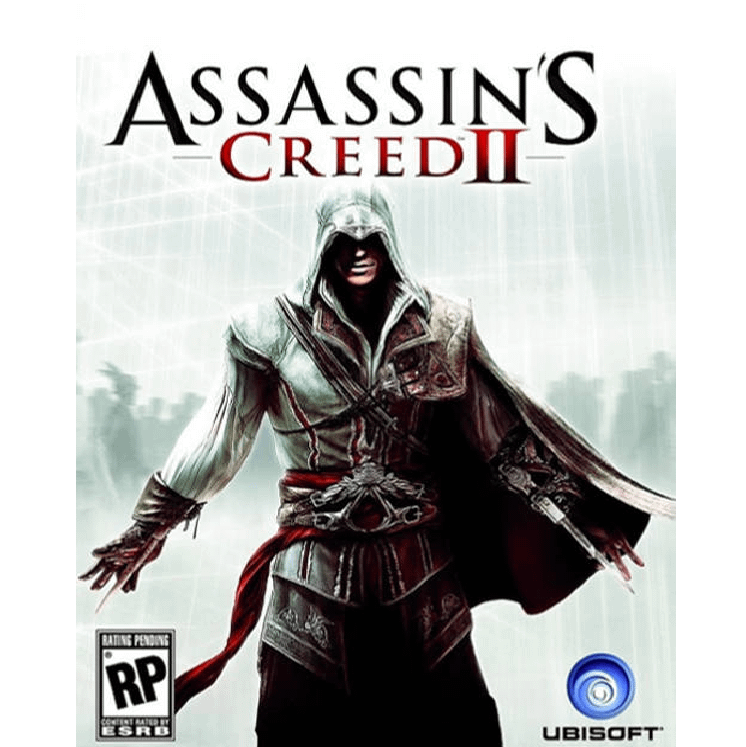
Assassins Creed II Deluxe Edition
Assassin’s Creed II Deluxe Edition follows Ezio Auditore da Firenze on a journey of revenge, discovery, and transformation in Renaissance Italy. With expanded content, bonus locations, and classic Assassin’s Creed gameplay, this edition is one of the most beloved entries in the series.
UShs5,000


Assassin’s Creed II Deluxe Edition
Assassin’s Creed II Deluxe Edition introduces Ezio Auditore da Firenze, a young Italian nobleman whose life changes forever as he is drawn into the centuries-old conflict between Assassins and Templars. Set during the Renaissance, the game combines stealth, action, exploration, and historical storytelling in a richly detailed world full of secrets and danger.
Building on the foundation of the original game, Assassin’s Creed II delivers smoother gameplay, a stronger story, and more variety in missions, cities, and tools. This Deluxe Edition also includes extra bonus content, making it a great choice for players who want the full Ezio experience. Available from Gamers Valhalla, your trusted store for digital PC games.
Included Content
- Altair Outfit
- Venecian Cape
- Medici Cape
- Palazzo Medici
- Santa Maria dei Frari
- Arsenal Shipyard
- Additional Throwing Knives
- The Auditore Family Crypt
- Battle of Forli
- Bonfire of the Vanities
- Bonus Skin Dye
- PSP Weapons PS3 exclusive
Game Details
- Release Date: March 9, 2010
- Update: May 27, 2020
- Version: v1.01
- Size: 3.89 GB
Languages
Audio: Spanish, English, French, Italian, German
Text: Spanish, English, French, Italian, German, Polish, Czech
Minimum Requirements
- OS: Windows XP / Windows Vista / Windows 7 (32-bit or 64-bit)
- CPU: Intel Core 2 Duo 1.8 GHz / AMD Athlon X2 64 2.4 GHz
- RAM: 1.5 GB (Windows XP) / 2 GB (Windows Vista / Windows 7)
- GPU: 256 MB DirectX 9.0-compatible graphics card with Shader Model 3.0 support
- DirectX: 9.0
- Sound: DirectX 9.0-compatible sound device
- Storage: 8 GB free space
Recommended
- OS: Windows XP / Windows Vista / Windows 7 (32-bit or 64-bit)
- CPU: Intel Core 2 Duo E6700 2.6 GHz / AMD Athlon 64 X2 6000+ or better
- RAM: 1.5 GB (Windows XP) / 2 GB (Windows Vista / Windows 7)
- GPU: GeForce 8800 GT / ATI Radeon HD 4700 or better
- DirectX: 9.0
- Sound: 5.1 sound device
- Storage: 8 GB free space
Installation
- Download the ISO file.
- Right-click the ISO and choose Mount.
- Open the mounted drive and run the installer or launcher.
- Follow the on-screen installation steps.
- After installation is complete, launch the game and enjoy.
Tips
- This is a classic PC release, so compatibility mode may help on some modern systems.
- Install on an SSD if available for smoother loading and better overall responsiveness.
- Take time to explore the Renaissance cities, as side content and hidden areas add a lot to the experience.
- Buy with confidence from Gamers Valhalla, a trusted store for digital gaming content.
Based on 0 reviews
Only logged in customers who have purchased this product may leave a review.
Related products
-
PC Games
Grand Theft Auto V / GTA V PC
Experience Los Santos an immense, living open world with three playable protagonists. Pull off high-stakes heists, swap between Michael, Franklin, and Trevor on the fly, and explore a satirical take on modern LA packed with activities, vehicles, and chaos.
SKU: GTA_V -
PC Games
The Crew 2 Gold Edition
High-octane motorsports across the USA! Master street racing, pro circuits, off-road rallies and more as you blaze through iconic landscapes with hundreds of vehicles. Capture every heart-pounding moment, race online with up to 7 friends, and chase fame across the nation.
SKU: The_crew2 -
-





There are no reviews yet.